

How to Choose an Ergonomic Chair for Each User
If you are deciding how to choose an ergonomic chair, start with fit rather than appearance. A useful office chair should support the person using it, work with their desk and allow adjustments they can understand. The word ergonomic on a product page does not tell you whether its seat, backrest or controls will suit your team.
Compare the adjustment range, try the chair during real work and check what happens after delivery. That approach is more useful than choosing the most expensive model or ordering a matching set from a photograph.
Key Takeaways
- Check how the chair fits the user and desk together, including supported feet and comfortable access to the keyboard.
- Look beyond seat height to seat depth, back support, tilt and usable controls.
- Trial shortlisted chairs with different users before making a larger purchase.
- Shared workstations need adjustments that people can find and reset easily.
- Include setup guidance, maintenance and replacement parts in the buying decision.
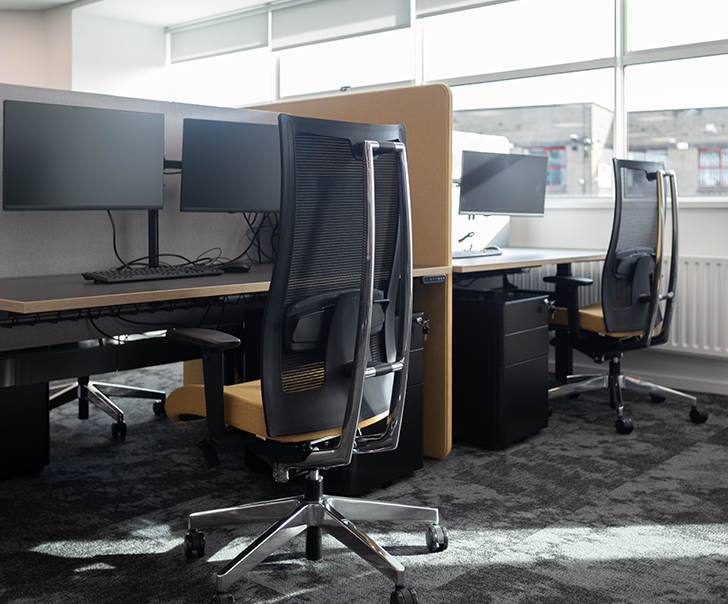
The workstations at H+K International show why a chair needs to be considered with the desk and screen. Check the complete working position during a trial rather than judging the chair in isolation.
1. Start with the Person and the Workstation
Write a short brief before comparing products. Who will use the chair? Will they spend most of the day at a computer, move between desks or alternate between desk work and other tasks? Include different body sizes and any individual requirements identified through a workstation assessment.
Measure the available space too. A chair must move comfortably beneath the desk and leave room to get in and out. Pedestals, desk frames and cable trays can restrict legroom even where the worktop looks generous. Consider the chair within your office space planning rather than treating it as a separate purchase.
For computer work, the HSA’s display screen equipment guidance describes a stable work chair with a height-adjustable seat and a backrest adjustable in height and tilt. It also identifies a footrest for anyone who requires one. Those are useful starting points, alongside the person’s assessed needs.
Separate common requirements from individual ones. You may be able to specify a main chair for most desks while allowing a different size or mechanism where needed. An employee should have a practical way to request a review without having to explain a personal health issue to the whole purchasing group.

The FBD Wicklow fit-out included furniture for staff and customers. A visitor chair and a daily task chair serve different purposes, so specify seating around the work being done and the time people spend using it.
2. Check the Chair and Desk Together
A chair that feels comfortable in a showroom may behave differently at your desk. Bring the user close enough to their working area to reach the keyboard and mouse without stretching. Check that their shoulders can remain relaxed and their feet are supported.
If the desk is relatively high for the person, lowering the chair until their feet reach the floor may leave their arms too low. A suitable footrest or a change to the workstation may be needed. Buying another chair without examining that relationship can leave the original problem unresolved.
Test the equipment in its normal position, including a docking station, separate keyboard or frequently used documents. A chair trial beside an empty desk will miss the reaching and clearance problems that appear once the workstation is being used.
Measure the working space, not only the chair
Ask for the seat-height range, seat dimensions, overall width and armrest measurements. Check them against the actual desk, including its underside. In a planned fit-out, 2D and 3D office design helps show furniture positions, but the final chair still needs a practical fit check.
Include space behind the chair for normal movement. Avoid assuming a narrow aisle will work because the chair fits when pushed fully under the desk. People need to use the furniture, not park it.
3. Compare the Adjustments That Affect Everyday Use
More levers do not automatically make a better chair. Each adjustment should have a clear purpose and a useful range for the intended users. Ask the supplier to demonstrate the controls, then let someone unfamiliar with the model try them. A feature that cannot be found or understood is unlikely to help much on a busy morning.
Seat height and depth
The seat should adjust to a suitable working height. Check depth as well: the user should be able to sit back against the backrest without the front edge pressing into the backs of their knees. A seat slide can help a chair accommodate different leg lengths.
Look at usable seat width and the position of the arms. A wide specification on paper may not reflect the space between fixed armrests. Try the seat rather than relying on its overall dimensions.
Backrest and lumbar support
Check where the backrest meets the person’s back. A pronounced curve in the wrong place can be less useful than a simpler support that fits. Ask which parts adjust: the whole backrest, a separate lumbar pad or both.
Test the chair while typing and during a more relaxed conversation. The person should not need to perch on the seat edge to escape the support. Choose a fit they can use comfortably rather than assuming firmer or more prominent support is always better.
Tilt, movement and controls
Ask how the tilt works and whether its resistance can be adjusted. Try reclining and returning to an upright working position. Check how any locking positions operate and whether the chair feels stable throughout normal use.
Controls should be reachable and understandable. Clear labels and a simple adjustment guide can be especially helpful where several people share a chair. Do not select a mechanism solely because the specification sounds technical; test what it lets the user do.
Armrests, base and castors
Armrests can help if they adjust to the user and allow the chair to approach the desk. Fixed arms that collide with the worktop can force someone to sit further away. Test height, width and any other adjustments with the actual working position.
Ask the supplier to specify castors suitable for your floor and the intended use. Check stability, the manufacturer’s user-weight limit and any relevant usage restrictions. A chair intended for occasional meetings may not be suitable for a heavily used workstation.
4. Run a Trial That Reflects Your Team
A short sit can rule out an obvious mismatch, but it does not show how a chair performs through ordinary tasks. Arrange a practical trial where possible, with clear return conditions. Use the same feedback questions for each model so the decision is based on fit and use rather than the latest opinion in the room.
Include different users and shared desks
Ask people with different heights and working patterns to take part. Include the person who finds standard chairs difficult to adjust, rather than selecting only enthusiastic volunteers. Record which adjustments worked and where a different specification may be needed.
Shared chairs need to accommodate changes between users. If you are planning a hybrid office, test how easily someone can reset the chair at the start of a working day. A consistent main model can simplify instruction, with alternatives retained for individual needs.
Ask useful questions during the trial
Check whether the user can sit back, reach their work and change position without fighting the mechanism. Ask about pressure from the seat edge, the position of the back support and whether the arms obstruct the desk. Look for specific observations rather than a single comfort score.
Give each participant the same setup demonstration. Otherwise, you may be comparing a properly adjusted chair with one nobody has learnt to use. During an office refurbishment, keep the trial feedback with the furniture brief so it informs the final order.
5. Check the Full Purchase Before Ordering
Once you have shortlisted suitable office chairs, compare the practical details of ownership. Confirm the exact model and options shown in the trial. Similar product names can cover different mechanisms, armrests or seat specifications.
- Confirm delivery and assembly. Establish who will unpack, assemble and check each chair.
- Read the warranty conditions. Check the stated use, exclusions and how a fault is reported.
- Ask about spare parts. Find out whether castors, arms, gas lifts and upholstery can be replaced.
- Check materials in person. Consider cleaning instructions, wear and how the finish feels during use.
- Agree support. Ask who will explain the controls and help if an adjustment is not working as expected.
Compare the complete supplied specification and support, not only the headline price. Keep a record of the chosen model and options for future maintenance or additional orders. Repairable chairs may remain useful longer, provided their condition and suitability continue to be checked.
If a supplier refers to testing or standards, request documentation for the exact model and configuration being purchased. Product testing is useful evidence, but it does not establish that a chair fits every employee or that the complete workstation is suitable. Keep the trial, specification and assessment as connected checks.
6. Set Up the Chair and Review the Result
Delivery is the start of using the chair properly. Show staff how to adjust it and arrange for a competent person to assess the complete workstation once it is in place.
Arrange a follow-up once people have used the new chairs in normal work. Check that the controls are understood and that any issues raised during the trial have been resolved. A useful purchasing record includes the person responsible for these checks.
Keep a simple route for reporting problems. A loose armrest needs maintenance; a poor fit may need a different chair or a change elsewhere at the workstation. Persistent discomfort should be raised through the appropriate workplace assessment and health support, rather than treated as something a more expensive chair will automatically cure.
Begin with a measured brief, test a shortlist and keep the setup instructions available. For help coordinating chair choices with the wider workspace, speak to iGate Interiors about the furniture and layout together.
Ergonomic Office Chair FAQs
Is mesh better than an upholstered backrest?
Neither material guarantees a better fit. Try the support, flexibility and feel of the particular chair. Check cleaning requirements and replacement options too.
Can a refurbished office chair be suitable?
It can be worth considering if it fits the user and its condition, stability and adjustments have been checked. Ask what was refurbished, which parts were replaced and what support is included.
Does an ergonomic office chair need a headrest?
A headrest is an option to assess, rather than a requirement for every user. Try its position and adjustment with the rest of the chair. Check that it supports a comfortable working position without pushing the head forwards or getting in the way.
Can a meeting chair replace a task chair?
A meeting chair may suit short discussions but may lack the adjustments needed for sustained desk work. Check the intended use and specification of the particular model. Select the chair for the work being done, rather than matching it to nearby furniture.

The dedicated workspaces in the GoFundMe Dublin project sit within a wider mix of office settings. For desk work, give people a chair they can set up properly and clear instructions for using its controls.