
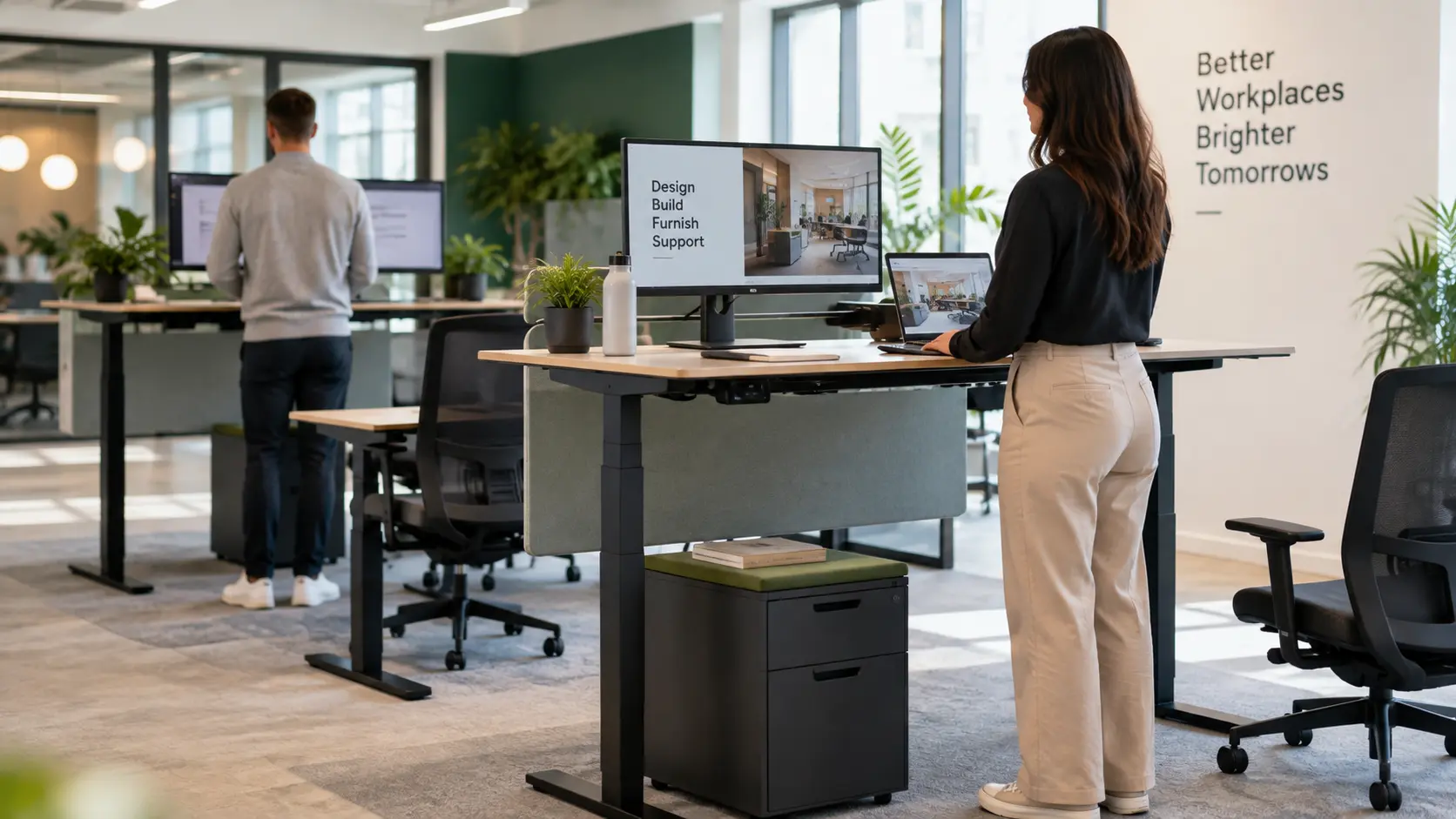
The benefits of standing desks are mainly about giving people more choice over how they work. An adjustable desk lets employees switch between sitting and standing without leaving their workstation. It can be worth the investment, provided it fits the user and gets used properly.
That does not mean standing all day is the goal. A good office setup should make it easy to change position, take movement breaks and work comfortably. The question is not whether standing is always better than sitting, but whether an adjustable desk would improve the working day for your team.
Key Takeaways
- Sit-stand desks can help reduce sitting time, particularly alongside support for changing workplace habits.
- The aim is to alternate positions, not replace prolonged sitting with prolonged standing.
- Assess the complete workstation, including the chair, monitor, keyboard and available space.
- Compare desks against employee needs and everyday tasks, rather than buying on appearance alone.
- Trialling a small number can help you decide whether a wider investment makes sense.

In collaboration with the client, IGate Interiors designed the space and coordinated the supply and installation of 58 sit/stand workstations, complete with dual monitor holders, cable management systems and acoustic screens.
What Is a Standing Desk?
A standing desk provides a work surface at standing height. For office use, the more flexible option is a height-adjustable sit-stand desk, which can also be lowered for seated work.
Electric models use powered controls, while manual versions require the user to adjust the height themselves. A desk converter is a raised platform placed on an existing desk rather than a replacement for the whole workstation.
For office work, flexibility matters. A fixed high table might suit a short discussion, but it does not offer the same choice for someone spending much of their day at a computer. Check that any model you consider accommodates both working positions.

What Are the Benefits of Standing Desks?
Less time spent sitting
The most straightforward benefit is the opportunity to do some desk work without remaining seated.
The researchers behind SMART Work and Life tested a programme to reduce sitting both with and without height-adjustable workstations. Participants receiving either version reduced their sitting time. The findings underline an important point: changing workplace habits matters alongside changing the furniture.
For an employer, that means planning a brief introduction to the desks, explaining their controls and making it acceptable to change position during ordinary work. An adjustable desk should be something employees can use naturally, not equipment reserved for special occasions.
It also offers a way to change position without abandoning a task. Someone handling a customer enquiry, for example, can raise the work surface while keeping their screen and notes available. That flexibility is useful, although it should not become a reason to skip breaks away from the desk.
More choice over working position
A sit-stand desk offers an alternative to spending a task in one position. The benefit is that flexibility, rather than a promise to correct posture or cure back pain.
Someone might choose to stand while reviewing a document, then sit for a longer drafting task. There is no need to assign particular tasks to a particular posture. Let employees find a workable routine within the guidance from their workstation assessment.
A more adaptable shared workstation
Consider a desk used by different colleagues across the week. Before specifying it, check whether each person can achieve an appropriate seated working height as well as a standing one.
This is a useful consideration for hybrid working offices. A desk that rises impressively high but does not lower sufficiently may still be a poor fit for some users. Assess the actual adjustment range, not simply whether the description says “height adjustable”.
Include the chair and screen adjustments in that evaluation. Changing the desktop height alone does not complete the setup.
Potential support for workplace wellbeing
The SMART Work and Life researchers also reported improvements in wellbeing and reduced stress in both programme groups. These were findings from a wider intervention, not proof that a desk alone delivers those outcomes.
Treat adjustable furniture as part of improving the working environment. Avoid building the purchasing case around guaranteed productivity gains or assuming that every employee will experience the same benefits.
What Are the Drawbacks of Standing Desks?
Standing for too long can cause its own problems, including discomfort in the feet, knees, hips and back. The Canadian Centre for Occupational Health and Safety cautions against prolonged standing when using these desks.
There are also practical costs to consider. Budget for delivery, installation and any changes to monitor supports or cable management, rather than comparing desktop prices alone. Ask what the warranty covers and how faults with the adjustment mechanism would be handled.
Before buying desks as part of an office refurbishment, consider whether other workstation problems need attention first. A new lifting mechanism will not fix a poorly positioned screen or make an unsuitable chair fit the user.
Finally, standing at a desk is not a substitute for physical activity. Keep walking and other movement in the working day rather than treating time spent upright as a replacement for exercise.
How to Use a Standing Desk Properly
Set up both seated and standing positions
Start with the user, not a standard height setting.
Position the keyboard close to elbow height, with relaxed shoulders and the mouse within easy reach. Keep the screen directly ahead and at a suitable viewing height. Retain a supportive, adjustable chair for seated work.
For Irish workplaces, the Health and Safety Authority provides display screen equipment guidance and workstation assessment resources. Use these to inform the assessment of the complete setup rather than treating a standing desk as an automatic ergonomic solution.
Anyone with persistent pain or a health condition affecting sitting or standing should seek individual advice from an appropriate health professional.
Alternate positions and keep moving
There is no single sitting-to-standing timetable that suits everyone. Start gradually, change position as needed and allow time to adjust. Follow individual recommendations where these have been provided.
Continue taking breaks away from the screen. A short walk or a change of activity offers something different from raising the desk while continuing exactly the same computer task. Work should allow opportunities to move around and vary posture.
Remove obstacles to adjustment
Test the desk with the equipment employees will actually use. Check the full movement with monitors, docking stations and cables in place.
Look for simple conflicts: a drawer unit beneath the descending desktop, a power cable pulled tight at standing height, or a monitor arm catching a shelf. Follow the manufacturer’s installation and operating instructions.
These checks belong in office space planning, not on a list of problems to solve after everyone has moved in. Show employees how to adjust the desk safely and who to contact if something is not working. Include that demonstration when introducing new starters to their workstation, particularly where desks are shared across teams.
Are Standing Desks Worth the Investment for Your Office?
Standing desks are worth considering when they address a genuine workstation need and employees can use them easily. They are less convincing as a blanket purchase made without consultation.
Start with people and work patterns
Ask staff what they need from their desks. Consider the time they spend on computer work, any specialist equipment and the arrangements for shared workstations.
For example, a design team using several monitors may need a different surface and equipment configuration from someone working with a single screen. Test each setup rather than assuming one specification covers every role.
Do not make standing a requirement or measure success by how long people remain upright. Keep individual adjustments central to the decision.
Look beyond the lifting mechanism
Ask suppliers to demonstrate the desk at the heights your employees need. Check stability with representative equipment in place, not an empty surface in a showroom.
Consider the usable desktop area, adjustment controls, equipment weight limits and access to replacement parts. For shared desks, also check how straightforward it is for a new user to reset the workstation.
The wider office layout matters too. Think about clearance around neighbouring furniture, storage access and what happens to screen privacy when somebody stands. Include these details when planning an office fit-out rather than choosing desks separately from the space.
Compare complete proposals. A quotation should make clear what is included in installation, accessories and ongoing support, so a lower initial price does not hide essential extras.
For an existing office, ask whether the proposed desks can work with furniture you intend to retain. Check screens, storage pedestals and monitor mounts individually. Keeping suitable equipment may be sensible, but compatibility should be established before an order is placed, not assumed because the desktops look a similar size.
Trial before committing to a wider rollout
A small pilot can answer questions that a specification sheet cannot.
Invite feedback from people doing different jobs. Ask whether the desk is comfortable in both positions, whether the controls are easy to use and whether equipment creates any difficulties. Check again after the initial novelty has passed.
Use that feedback to decide what to change before ordering more. The outcome might be a wider rollout, a different desk specification or a mixed approach with adjustable desks where they are most useful.
Choosing Desks That Work for Your Team
The strongest case for standing desks is a practical one: provide a workstation that fits the employee and gives them useful choices throughout the day.
Start with an assessment, involve the people using the furniture and trial the setup before making a large commitment. Keep suitable seating and movement breaks in the plan.
iGate Interiors can help bring furniture selection, office design and commercial fit-out planning together. The aim should be a workplace that works for your team, with standing desks included where they earn their place rather than simply follow a trend.
Standing Desk FAQs
Is an electric standing desk better than a manual one?
Not automatically. Choose a desk that employees can adjust easily with their normal equipment in place. Compare the height range, stability and adjustment effort rather than the mechanism alone. Both seated and standing positions need to suit the person using the workstation.
Can you convert an existing desk into a standing desk?
Yes. A standing desk converter sits on or attaches to a suitable existing desk, allowing you to raise your screen, keyboard and mouse without replacing the whole workstation. Check its dimensions, equipment capacity and adjustment range, including whether it allows comfortable seated work when lowered.
Do standing desks take up more office space?
Not necessarily. A height-adjustable desk with the same overall width and depth can occupy a similar footprint to a conventional desk. However, the layout must allow it to move freely. Check surrounding storage, screens and cable lengths, and retain enough room for the chair and access around the workstation.
Are standing desks suitable for hot desking?
They can be, provided the adjustment range suits the different employees using them. Check that each person can achieve a suitable working height when sitting and standing. The chair and monitor should also be adjustable, so colleagues can set up the complete workstation rather than changing the desk height alone.
Can you use a laptop on a standing desk?
Yes. For prolonged laptop work, use a separate keyboard and mouse with a laptop riser or external monitor. This lets you position the screen independently from your hands. Check the setup at both seated and standing heights, rather than simply raising the laptop and continuing to use its built-in keyboard.